


Secret Codes & Device Info
4.33.00 Reviews
App Specs
- Version
- 1.13
- Updated On
- License
- Free
- Downloads
- 50,000+
- Developer
- Smart AI Utility Apps
- Categories
- Libraries & Demo
- Platform
- Android
Screenshots
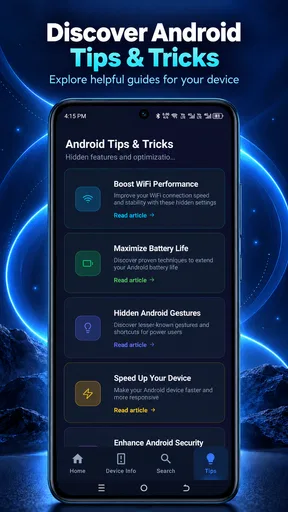
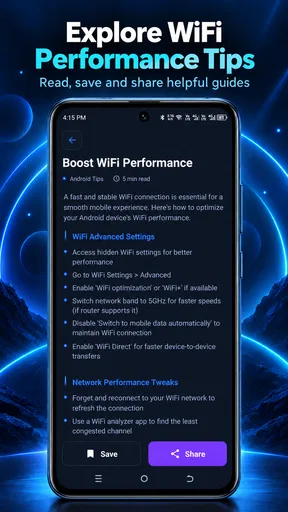
 Analysis by AppCompare
I’m drawn to phone tools that help me understand what a device can do, but secret codes are not magic shortcuts: their effects can depend on the handset and Android version. Secret Codes & Mobile Hacks is aimed at that curious, hands-on user. I’d treat it as a reference for exploring Android codes and mobile tips, not as a universal key that unlocks every feature on every phone.
What to expect before you start
The app is a free utility from AcmeSoft in the Libraries & Demo category. It has over 10,000 installs, is rated for Everyone, and its current version is 1.12; the app was released on February 17, 2026. The displayed average rating is 0.0, so I wouldn’t use that figure as a strong signal about how useful it will be for your particular phone. Optional in-app purchases are listed at prices from $2.49 to $19.99 per item, which is worth keeping in mind if you prefer to avoid paid extras.
For speed, my expectations are modest and practical. A code-reference app should be useful when it gets me to relevant information without turning a quick check into a research project. The value here is less about making the phone itself faster and more about helping me find a setting or diagnostic route efficiently. I would still expect to verify that a code suits my exact model before entering it: a familiar-looking sequence is not a guarantee of a familiar result.
A sensible way to use codes and tips
I’d begin with a specific question rather than trying codes at random. If I wanted to inspect a device identifier or understand a diagnostic option, I’d first check the phone’s brand and model, read what the code is meant to do, and decide whether I actually need that information. Some codes merely display details; others can open menus where changing an option may have consequences. That distinction matters more than how intriguing a code sounds.
One useful habit is to write down the setting’s original state before changing anything. If a menu offers a toggle or network-related choice, taking a moment to note what was selected gives me a reference point if the phone behaves differently afterward. I’d also avoid changing several options in one sitting. Making one change at a time makes it much easier to spot what caused an unexpected result and to undo it.
For an everyday example, imagine a phone that seems to have lost a feature after a settings change. Instead of tapping through unrelated menus or entering several codes, I’d use the app to identify a relevant diagnostic or settings route, confirm it matches my device, and inspect without changing anything first. If the information points to a deeper issue, I’d stop there and use the phone maker’s support resources rather than treating a code as a repair tool.
Unmasking Your Device's Secrets
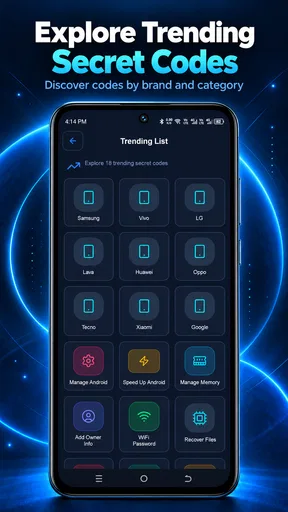
First things first, installing Secret Codes & Mobile Hacks is a breeze. Once you open the app, you're greeted with a straightforward interface that invites you to dive right in. The layout is intuitive, neatly categorizing codes based on phone brands and functionalities. Whether you're a tech newbie or a seasoned hacker, this app makes it easy to navigate through its treasure trove of secrets.
Worth Reading Before You Choose

EA SPORTS FC Mobile 26 Is a Bigger Football Game, but It Takes Time

Flipboard Shows What News Apps Must Do Beyond the Feed

Switching to Android Auto Means Rethinking Your Driving Routine

Google Calendar Makes a Crowded Week Easier to Manage

Ludo King Makes the Most of the Minutes Between Plans

Baby Panda World Brings Quick Play to Modern Phones, but Its Game Library Feels Busy
Exploring the Hidden Codes
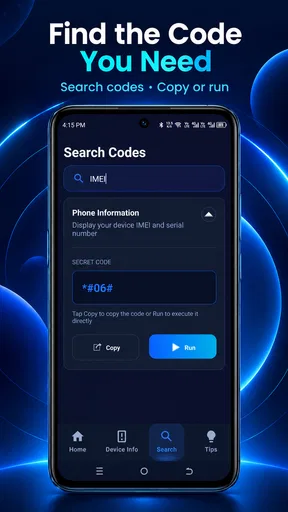
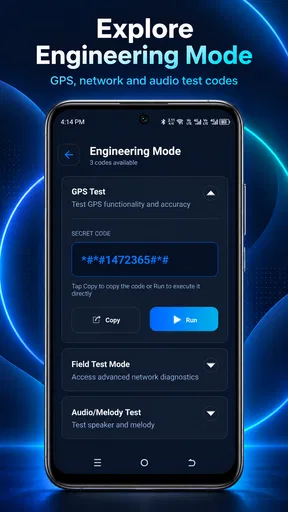
One of the coolest features is the way it lets you explore hidden codes specific to your device. These codes can unlock everything from diagnostic tests to network settings. I found myself impressed by the sheer number of options available. For example, typing in certain codes can reveal your phone's IMEI number or launch the testing mode for various hardware components.
Security Tip: While these codes are generally safe to use, it's always wise to proceed with caution. Some codes might alter settings that could affect your device's performance, so make sure you know what you're doing before you dive too deep.
When use gets heavier
The moments that call for more care are not necessarily the ones involving the most codes. They’re the ones where I’m troubleshooting connectivity, checking a hardware test, or browsing menus that can affect how the phone communicates with a network. In those situations, I’d keep the app open as a reference, but I wouldn’t assume that every listed route is active on my handset. Manufacturers and carriers can vary what is available, and a code that does nothing is not proof that the phone is broken.
I’d also separate looking from changing. If I’m curious about a diagnostic screen, simply opening it and reading the labels is a lower-risk first step than editing unfamiliar values. If a code opens a menu that looks technical or irreversible, I’d back out rather than experiment. That restraint is especially useful when the phone is someone else’s primary device or when I rely on it for work, travel, or urgent calls.
Mobile Hacks for the Adventurous
Beyond secret codes, the app also offers a selection of mobile hacks. These are tips and tricks designed to optimize your smartphone experience. From boosting battery life to enhancing performance, these hacks are a great way to get more out of your device.
One hack I particularly liked involved tweaking the developer settings to speed up animations, making the phone feel snappier. It's these little adjustments that can make a big difference, and the app does a great job of making them accessible to everyone.
Reliability, compatibility, and limits
My main reliability caveat is compatibility, not the speed of browsing a reference. Android codes can vary by manufacturer, model, software build, and sometimes carrier. A code may be unsupported, open a different screen, or behave differently after an update. I’d treat each entry as a lead to check against my own device rather than a promise that the same action will work everywhere. This is why a brand-specific label is helpful, but not a substitute for confirming the exact model.
The app is listed for Android 7.0 and up. That gives older compatible phones a potential way to consult it, but operating-system eligibility alone does not make every code compatible with every device. If I were relying on a code for a repair or a network change, I’d look for model-specific guidance from the manufacturer first. For routine curiosity, I’d keep the stakes low and avoid changing anything I couldn’t confidently restore.
Resource demands are also best judged by what the task requires: consulting code information is not the same as running a hardware-intensive tool or a continuous monitor. I wouldn’t expect this app to improve a phone’s physical performance by itself. Its practical contribution is helping me find instructions and options; the result of following a tip depends on the device and the change. If my phone is already struggling, I’d prioritize built-in storage and battery settings or official support over trying a collection of tweaks.
Who benefits, and who should choose another route?
I can see this being useful for Android owners who enjoy learning their device’s menus, want a convenient place to browse code-related information, or are comfortable checking a setting before changing it. It may also suit someone helping a family member identify a diagnostic screen, provided they take the time to confirm the handset and explain what they’re opening. The app’s Everyone rating does not mean every advanced menu is suitable for careless experimentation; age classification and technical risk are different things.
It is less suitable for someone who wants a one-tap repair, guaranteed performance gains, or a universal list that works identically across phones. A manufacturer’s support app or official help page is a better choice when the issue is specific and consequential. For a single basic question, the phone’s own settings search may be quicker. Compared with generic web searches, a dedicated reference can feel more organized, but web results or official documentation may provide more context for an exact model. I’d choose based on whether I need quick browsing or authoritative, device-specific instructions.
Is It Worth the Download?
So, is Secret Codes & Mobile Hacks worth a spot on your phone? If you're someone who loves to tinker with tech or wants to get the most out of their smartphone, I'd say yes. The app provides a wealth of information and tools that are both fun and functional.
However, remember that with great power comes great responsibility. Some of the hacks and codes can lead to unintended consequences if used improperly, so it's crucial to use this app with a bit of common sense.
My performance verdict
As a performance aid, I’d call it a reference rather than a booster. I would not install it expecting an automatic speed-up, a guaranteed battery fix, or a way to bypass a device limitation. Its usefulness comes from helping a curious user approach codes and phone tips with a little more direction. Stability and recovery depend on what a person chooses to change, so the safest workflow is to inspect first, make only one low-risk adjustment at a time, and stop when the instructions no longer clearly match the handset.
In conclusion, Secret Codes & Mobile Hacks is a fascinating app for anyone looking to delve deeper into their mobile device's potential. It's user-friendly, packed with features, and a bit of a tech geek's dream. Just make sure to proceed with caution and enjoy the journey into the hidden world of your smartphone.
Pros
- User-friendly interface for easy navigation.
- Extensive database of codes and hacks.
- Regular updates with new features.
- Compatible with most Android devices.
- Offline access to saved codes.
Cons
- Contains ads that can disrupt usage.
- Some codes may not work on all devices.
- Requires in-app purchases for premium content.
- Limited customer support options.
- May require technical knowledge to use effectively.
FAQs for Secret Codes & Device Info
What is Secret Codes & Mobile Hacks, and how does it work?
Secret Codes & Mobile Hacks is an app designed to unlock hidden features on your Android or iOS device. By using specific codes, you can access functions like testing modes, hardware information, and troubleshooting tools. The app provides a comprehensive list of codes for various brands and models, making it easy to enhance your mobile experience.
Is Secret Codes & Mobile Hacks safe to use on my device?
Yes, Secret Codes & Mobile Hacks is generally safe to use. The codes provided are standardized for accessing built-in features and diagnostics. However, it's crucial to use them responsibly, as some codes can change system settings or affect the device's functionality. Always read the instructions carefully and proceed with caution.
Can Secret Codes & Mobile Hacks work on all mobile devices?
The app supports a wide range of Android and iOS devices, covering many popular brands such as Samsung, HTC, and LG. However, compatibility may vary depending on the device model and its operating system version. It's recommended to check the app’s compatibility list to ensure your specific device is supported.
Do I need any technical knowledge to use Secret Codes & Mobile Hacks?
No special technical knowledge is required to use Secret Codes & Mobile Hacks. The app is user-friendly and provides clear instructions for each code. However, understanding the purpose of each code and its potential impact on your device is important to avoid unintended changes or issues.
Are there any costs associated with using Secret Codes & Mobile Hacks?
Secret Codes & Mobile Hacks is free to download and use, with optional in-app purchases for additional features or ad-free experiences. While the basic functions are available at no cost, some advanced tools or premium content may require a purchase. Always check the app store listing for the latest pricing information.


